ONEDC uses groups to manage what users can view and access in ONEDC, and which racks can be physically accessed.
Each group has default permissions for all its users. You can view all groups, create a group, show or update group permissions, and manage group membership.
Additionally, you can set or manage rack permissions, adjust group permissions, and delete groups.
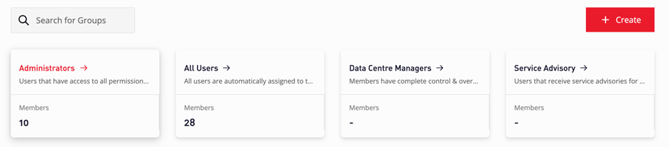
ONEDC has the following default groups which have pre-defined permissions which cannot be changed. However, you can add and remove members from the group and create new groups.
|
Group |
Description |
|
Administrators |
Users with access to all permissions and racks. NOTE: You cannot change the default permissions assigned to the Admin group. To promote a user to be a customer administrator, add the user to the Administrators group. For example, you can promote a user to be a customer administrator if the existing administrator leaves without nominating other users to be administrators. |
|
All Users |
By default, all users are automatically assigned to this group. |
|
Data Centre Managers |
Users with full access to manage data centre infrastructure. |
|
Service Advisory |
Users that receive service advisory notifications (including outages, etc.) for the selected data centres. See Manage service advisory subscriptions. |
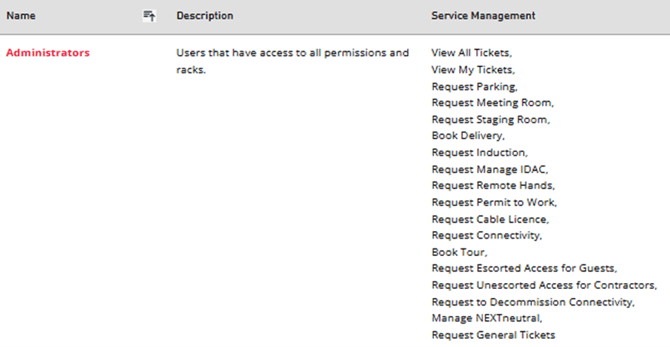
Generate the User Group Report to view a summary of information for all user groups. The Service Management column lists the permitted activities for the group:
To set specific permissions that differ from the preset groups, create a new group.
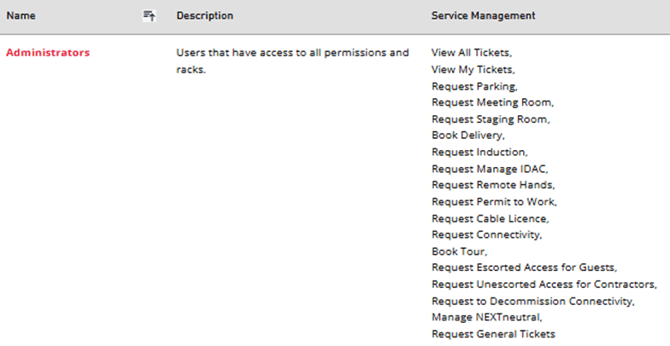
You can also generate the User Group Report to view a summary of information for all user groups. The Service Management column lists the permitted activities for the group: