The Colocation area within ONEDC allows you to easily organise, monitor and visualise all racks hosted by NEXTDC along with the ability to add your own unmanaged rack spaces. A rack is a standard frame or cabinet to hold and organise your IT devices including servers, switches, routers, etc.
NEXTDC will allocate any NEXTDC supplied racks into the Colocation section without any user interaction required. You may also further modify the space as outlined below.
Manage colocation in ONEDC
The colocation can be managed in 3 simple steps:
- Setup your spaces: Define rack location (city, data centre, hall, etc.) for any racks that are not managed by NEXTDC (if required).
- Add your devices: Create equipment list (servers, switches or other assets you are using).
- Assign the devices to a rack: Place your equipment into the right rack.
Spaces: Organising Rack Locations
ONEDC uses "spaces" to group and identify where the racks are located by City, Data centre, Hall and Row.
- City – geographical location of the data centre (e.g. Brisbane)
- Data Centre – data centre location in a city (e.g. B1)
- Hall – space or location in a data centre (e.g. Hall 2)
- Row – physical arrangement of server racks (e.g. Row 3)
There are two terms for spaces:
- Top-level spaces - Main categories that can hold infinite numbers of sub-spaces but cannot become a sub-space.
E.g.: (City – Data centre) Brisbane – B1 And B2; Melbourne - M1
- Sub-spaces – Further breakdown from Top-level spaces for easier navigation to multiple rack locations. E.g.: (Floor – Hall – Row) B1 – Floor 1 – Hall 2 – Row 3
You can create a Top-level space for each city and data centre, and unlimited sup-spaces under the top-level space.
⚠️ Important: The space configuration is shared across all the ONEDC tenancy, any changes will impact all the users. Please check with your co-workers before making any modifications if multiple users are using this tool.
Rack Naming Convention
Rack naming follows the standard format below:
Facility - Data Hall – Row - Rack
Example: A rack in Row 3, Data hall 2 at Level 1A in facility C1 (Canberra).
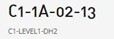
💡 Note: You can also add tags (“Testing”, “Production”) and images to identify your racks.
Type of Racks
NEXTDC has the following types of racks in ONEDC:
- Managed rack
- NEXTDC provides the rack and conducts rack management.
- Customers cannot move a managed rack.
- Unmanaged rack
- NEXTDC provides the rack, and customer conducts their own rack management.
- Customers can move an unmanaged rack between a managed or another unmanaged space.
- Bring Your Own Rack (BYOR)
- Customer provides their own racks in the data centre.
- Customer has complete control over the equipment and configuration.
- Ideal for customers who have specialised equipment or configurations that are not readily available from the data centre.
Rack Colours in ONEDC
ONEDC uses colours to identify the racks with Unmanaged Racks shown in light grey, and Managed Racks (those provided by NEXTDC) in white.
Rack Status
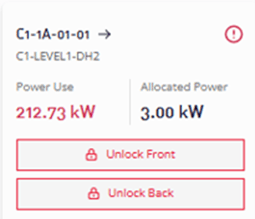
ONEDC shows the status of the rack including Power used, Allocated power, and enables you to unlock front or rear doors.