
To show/update account information for another user:
- In the Main Menu select User Management
- Click Users
- Search for the user.
- Click to select the user.
- ONEDC shows the user information.
- You can also request an induction for the selected user.
- Update the information (Optional)
- To add/remove ONEDC Portal access:
- In the Portal Access area, click Manage.
- Enable or Disable the Do you want this user to be able to log in to ONEDC checkbox.
NOTE: You cannot remove ONEDC Portal access for an administrator user. You must delete the user from the Administrator group first: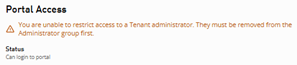
- Click Save to save the information or click Cancel to quit without saving.
- Click Okay to acknowledge the confirmation message.
- ONEDC updates the user profile to note that an invitation to access the ONEDC Portal has been sent.
NOTE: You can show/update your own account information via My Profile