
To install your own cabling using NEXTDC's overhead cable trays (i.e. run cabling between two non-adjacent racks) you must apply for a Cable License. Cable licenses incur a monthly charge as a contribution to the underlying cable tray and facility infrastructure investment.
Cable licenses are not required when running cables between your racks using the cable pass through routes that can be opened between racks. They are also not required if you have ordered dedicated cable ducting between your racks.
Customers can also request NEXTDC to engage their own contractor to carry out cabling work on their behalf.
Before submitting your Cable Licence request, you can contact our Facility Operations team to discuss your intended cable path. NEXTDC can also provide floor plans and meet you for an on-site walkthrough to discuss your Scope of Work (SoW), answer any questions and ensure you have all the required documentation to submit your request.
To request a new cable licence:
- In the Main Menu, select Requests » New Request and click the Cable Licence
- Select the Facility and use the Calendar in Work Details to specify the period of work.
- Select the applicable options in Work Specifications. You must select at least one option.
- Enter Purchase Order (PO) number if applicable
- Click Next to continue or click Cancel to quit without saving.
- If NEXTDC has organised a contractor for you, select NEXTDC Organised Contractor.
- Click Next to continue or click Cancel to quit without saving.
- Enter the Visitor and Primary Contractor The Primary Contractor is the individual responsible for communicating with NEXTDC through the lifecycle of the request and signing any required documentation.
- Click Next to continue or click Cancel to quit without saving.
- Click Add to add cable information:
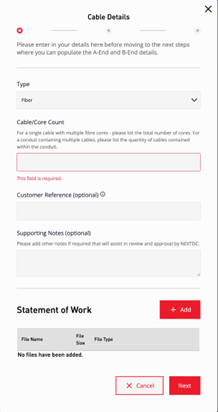
- Enter the Cable Details and use the File Manager to add a Statement of Work.
- Click Next to continue or click Cancel to quit without saving.
- Enter the A-end Location. The location can be one of:
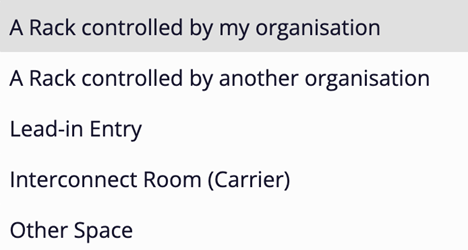
Depending on the option selected, ONEDC prompts you to enter additional information which may include a Letter of Authority. - Repeat the previous step to provide the B-end Location.
- You may continue to add multiple cables by repeating steps 11 to 14. Once all cables have been added, click Next.
- Upload the mandatory Safe Work Method Statement (SWMS) and Valid Certificate of Currency and Insurance. Optionally also add other relevant documents as applicable then click
- Click Next to continue or click Cancel to quit without saving.
- ONEDC shows a summary of the request. Confirm the information is correct and update if required.
- Review and accept the Conditions.
- Click Submit to submit the request or click Cancel to quit without saving.
- ONEDC will confirm your submission and an email will be sent to you. Click Okay.
NOTE:
The Cable License includes a Permit to Work (PTW) request avoiding the need to raise a separate access request. Once approved, the ticket number covers the Cable License and a site access request for visitors listed on the request.
RULES:
- All cabling works must be performed and serviced by a licensed Cabling Contractor, in accordance with the approved scope of work and the NEXTDC Structured Cabling Installation Requirements. Cabling must be installed in accordance with ISO247.
- Once approved, Permit to Work is valid for 90 days.
- Cable License Requests must be submitted 7 days prior to the planned work commencement date to allow time to review.
- You must submit the following information:
- Safe Work Method Statement (SWMS) – provide all necessary SWMS required for the work (e.g. SWMS for Cable installation, SWMS for equipment rack installation).
- Valid Certificate of Currency and Insurance – provide all necessary insurances
(e.g. Public Liability, Professional Indemnity, Workers Compensation). - Statement of Work – provide as much detail as possible on the work you intend to carry out, including required areas of access.
- You can also submit additional documentation that supports your request
(e.g. Letter of Authority if accessing equipment for another organisation, project scope, cabling diagrams, MOPS).
IMPORTANT! Once approved, you can conduct the physical provisioning to run the cables. After completing the work, you must notify NEXTDC who will visually inspect all work to ensure it complies with NEXTDC standards. If the works have not been completed to a suitable standard, NEXTDC will require you to rectify the works to a suitable standard at your cost.
To review existing cable licences:
- In the Main Menu, select Services » Connectivity
- A full list of all services will be shown. Enter “Cable Licence” in the Search box to filter for only Cable Licenses