
NOTE: You cannot delete a managed device template; you can only delete unmanaged (i.e. user-defined) device templates.
You cannot delete device templates currently in use. If you attempt to delete a device template with linked devices, ONEDC shows a warning message. You must unlink all devices from the template before you can delete the device template.
To delete a device template:
- Select Services » Devices.
- Click View Device Templates.
- ONEDC shows the device templates.
- Click a device template to view detailed information.
- Click Delete.
IMPROTANT! You cannot delete device templates currently in use.
If the device template is in use, ONEDC shows a warning message: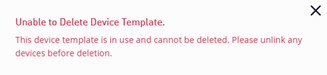
You must unlink all devices from the template before deleting the device template. - ONEDC confirms you want to delete the device template.
- Click Confirm to delete the device template or click Cancel to quit without saving.
- ONEDC deletes the device template.